Development / Selected projects
Useful code.
Considered
systems.
Tools for creating, organising and adapting the way we work and play.
A selection of my software projects, from editorial workflows to administrative automation and game tools. Each has its own scope, release stage and source code.
01 / BlogArtifex
From a document
to a published post.
A writing and publishing workspace for Blogger. I developed it around a familiar editorial problem: bringing a document into an editor without losing the structure, images, tables and typography that make it readable.
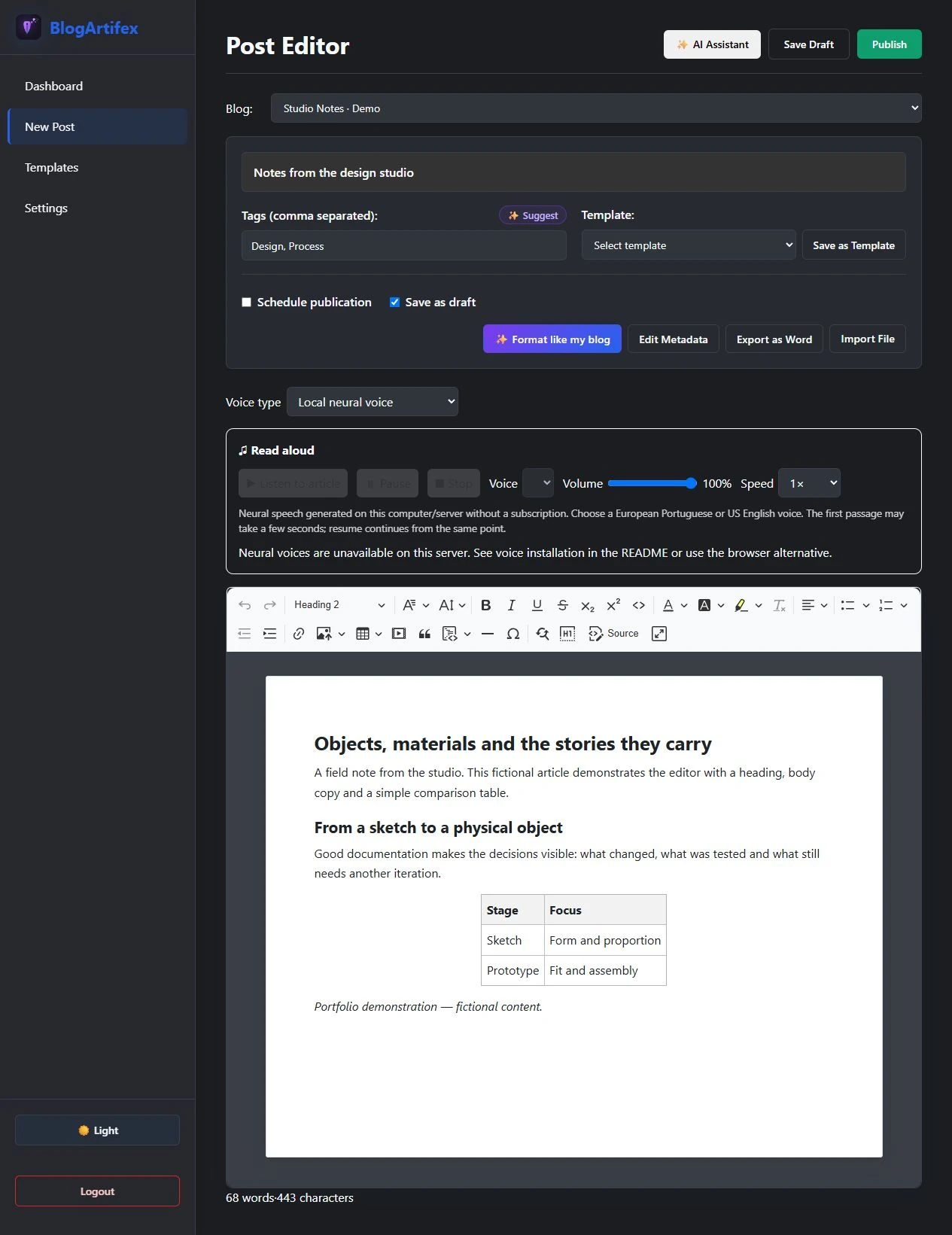
Actual editor interface / local demonstration with fictional content · Publishing and external accounts disabled for the capture.
The formatting
is part of the article.
Moving between Word, a browser editor and Blogger can break layout decisions. BlogArtifex brings document import, rich-text editing, image placement and reusable templates into one workflow.
Import a .docx or start with a template. Shape the article in the editor, organise its labels and metadata, then prepare it for a Blogger draft or publication.
My work covers the interface, editor integration and the document-to-Blogger formatting pipeline. The optional AI and voice features sit alongside the core editing workflow.
EDITORIAL WORKFLOW / ILLUSTRATION
Bring the content.
Start in the editor or import a Word document.
Keep the layout.
Arrange images, captions and tables while preserving formatting.
Reach Blogger.
Prepare a draft and move the article into the publishing workflow.
React / JavaScript · Document import, editor integration and publishing workflow. Diagram illustrates the workflow; it is not a screenshot of the application.
02 / SIPOS
Less repetition.
Clearer output.
SIPOS — Sistema Inteligente de Processamento de Ordens de Serviço — is a Windows application for preparing the daily administrative orders used in military units. It brings duty-roster data from Excel and document templates in Word into a more repeatable preparation workflow.
WHAT IS AN ORDEM DE SERVIÇO?
A daily document that brings together official instructions, duty appointments and other unit information. Preparing it involves gathering material, checking dates and assembling the approved content into the correct structure.
SIPOS focuses on the repetitive preparation work. Human review and command approval remain part of the real administrative process.
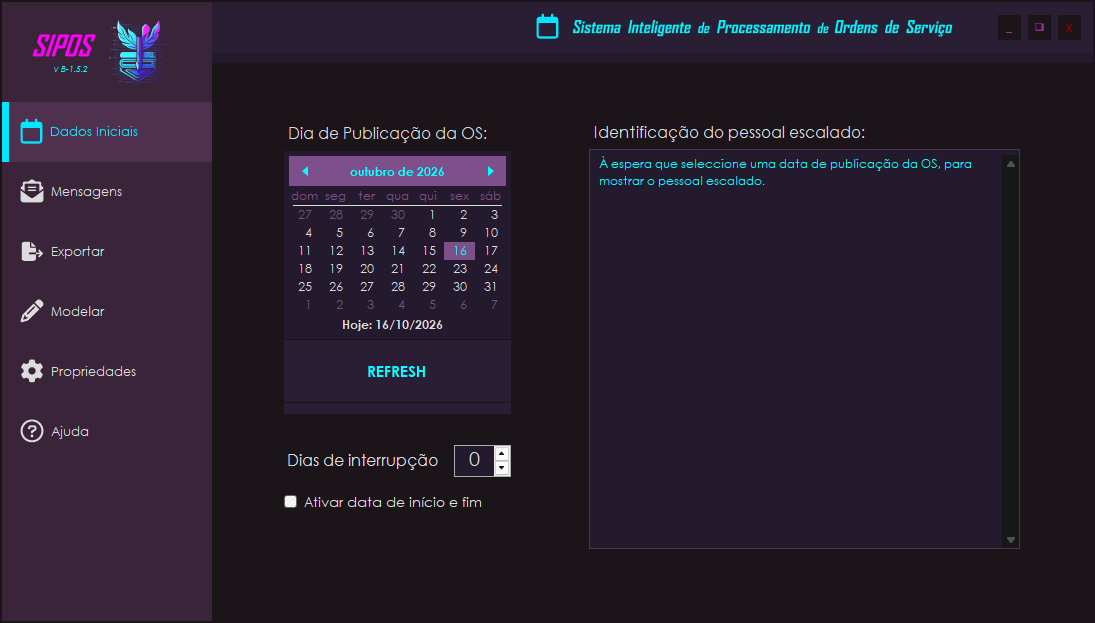
Actual SIPOS interface / isolated local build · No real roster or personnel data loaded.
Several sheets.
One preparation flow.
The application reads Excel duty rosters, identifies dates and nominated personnel, and uses that information to prepare the relevant entries.
The document
has a structure.
Word templates and ordered document actions define how the output is assembled. Publication dates, interruptions and date ranges matter because a single order can cover more than one duty day.
C# / Windows Forms / Word and Excel interoperability. A working beta under active development; automatic message classification and machine learning remain future work.
DATE-RULE ILLUSTRATION / SYNTHETIC DATA
C# / .NET · Excel and Word interoperability. The example explains a date rule using fictional data; it contains no personnel or operational records.
03 / More Picks & Points + FlexScript
A mod.
Room to configure.
A Stellaris mod and a companion command-line tool that make empire creation configurable. MPP changes the available ethics, civics and species traits; FlexScript gives players presets and custom values without hand-editing the mod files.
##################################################### # Stellaris MPP Mod Customization # ##################################################### This menu allows you to customize various aspects of the Stellaris MPP mod. You can choose 'vanilla' for default game settings, 'standard' for mod default presets, 'custom' to manually enter your preferred settings, 'reset' to attempt loading the saved settings (if possible) and 'return' to cancel and skip this step. Please note that choosing 'custom' will prompt you to input values for each setting. Refer to the displayed tables for Vanilla and Standard values as a guide.
Original menu output / executed from the project’s functions in isolation.
THE PROBLEM
Your empire.
Your parameters.
Stellaris assigns a budget to the choices that define a civilisation. Increasing that budget changes what players — and computer-controlled empires — can create.
I work on the FLEX edition of MPP and developed the Python configuration tool. It builds on the original MPP work by Athinks, credited in the Workshop project.
FlexScript locates the relevant files, offers presets or custom values, and writes the selected settings. Its server mode prepares a shared configuration for friends playing together.
THE CONFIGURATION, MADE CONCRETE
Two values.
An immediate change.
These are the actual results of running the file-editing function against a small demonstration file. No installed game or Workshop files were used.
ETHOS_MAX_POINTS = 3 GOVERNMENT_CIVIC_POINTS_BASE = 2
ETHOS_MAX_POINTS = 5 GOVERNMENT_CIVIC_POINTS_BASE = 5
PRESET COMPARISON / ILLUSTRATION
Python / configuration, file processing and multiplayer setup. The menu and file example come from the original code; the comparison above is interactive. Stellaris belongs to its respective creators. Compatibility depends on the game version and other installed mods.
04 / Multi-monitor tools
A wider view.
A specific problem.
Three separate monitors, one game window. X4 repeatedly resizes an oversized window back onto a single display; this project addresses that specific behaviour with a Windows launcher and an X4-only window-management hook.
One continuous client area. Independent Windows displays.
Technical illustration of the documented layout / not a gameplay screenshot.
The window
keeps snapping back.
Changing the saved resolution alone is not enough: X4 asks Windows about the selected monitor and constrains the window to that display. A generic window mover can end up fighting this resize loop.
Set the boundary
before the window exists.
The launcher prepares a backed-up window configuration, starts X4 suspended and loads a C++ / MinHook hook before window creation. The hook presents the requested desktop rectangle to X4 and keeps the game window within it.
The game still uses its own Vulkan renderer. This is window management; native triple-projection, per-monitor field of view and bezel correction are outside the tool’s scope.
FROM THE RELEASED EXECUTABLE
Inspect before launch.
The dry-run reports the detected desktop without launching X4 or changing its settings. The width below is the local capture machine’s layout; the reference diagram above shows a different supported arrangement.
--self-test
Self-tests passed.
--dry-run
Desktop target : x=-1920 y=0
width=6400 height=1440
Dry run complete;
nothing was changed or launched.Actual executable output, excerpted for clarity / file paths omitted.
An external PowerShell wrapper for spanning the game window across independent displays.
A separate PowerShell tool for a mixed-resolution multi-monitor window.
C++ / Windows / PowerShell. Scope and technique differ between tools. X4 remains a beta: HUD and maps may stretch, and this does not provide native triple-projection rendering.